Solve it. Play it. Beat it. Get up!
No snooze, no dismiss — only a real wake-up mission stops the ring. Cukkoo removes the escape hatches you reach for at 6am, while you're still too groggy to be trusted.
- Goal Lock — no editing it away
- Fires through Doze & DND
- Camera/mic data never leaves your phone
RISE & SHINE
6:42
Mission: Math (Easy)
No snooze. No dismiss. Complete the mission.
Drag it, tap snooze, tap the X — go on. Only the mission stops the ring.
The problem
Willpower fails at 6am. So we didn't build on it.
Every excuse for not waking up is one you've already used. Cukkoo was built by closing each one, on purpose.
“I'll just turn tomorrow's alarm off tonight, I'm not feeling it.”
Goal Lock
Inside its lock window, an alarm can't be edited, disabled, or deleted — from any screen, by anyone, including groggy-you.
“I'll just hit snooze this once.”
No snooze, no dismiss
There's no snooze button, no swipe-away, no notification action, no back-button shortcut. The ring is the ring.
“I'll force-close the app so it can't ring.”
Built to actually fire
Custom native scheduling survives Doze, aggressive battery optimization, Do Not Disturb, and a force-closed app.
How it locks
Three mechanisms. Zero escape hatches.
01 — Goal Lock
Set it. Mean it.
Every alarm locks itself hours before it rings, so 2am-you can't quietly switch it off. The lock window starts at 4 hours and you can widen it to 12 for extra commitment — it only ever adds protection, never removes it.
02 — The ring
No snooze. No dismiss.
No swipe-away, no back-button shortcut, no notification action that stops it early. The only way to stop a ringing alarm is to complete the wake-up mission you picked for it.
03 — Wake-up missions
Wake your brain, not just your thumb.
Pick per alarm: a math problem, a typing or voice challenge, a quick memory game, a physical shake, holding the phone still, or photographing a real-world object — verified entirely on-device.
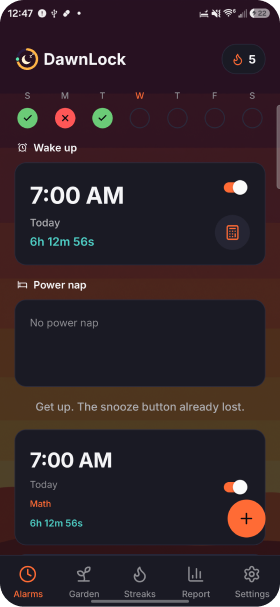
The mechanics
Try them. They're not just screenshots.
Six ways to prove you're awake
Pick the mission that actually wakes your brain, not just your thumb.
A couple of problems, no calculator.
Goal Lock
The closer the alarm, the harder it is to touch. You decide how hard.
Default: can't edit or disable this alarm for the final 4 hours.
Built to actually fire
An alarm that silently fails is the worst bug this app could ship — so it doesn't.
Doze mode, battery optimization, Do Not Disturb, force-closed — the alarm doesn't care.
Progress & motivation
Every win is counted. Nothing is faked.
Progress syncs via the cloud, so it survives switching devices — these are real in-app screens, not mockups.
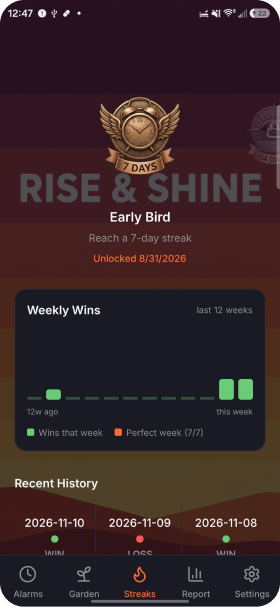
Streaks
Weekly wins as a bar graph across a rolling 12-week window, plus a swipeable history of every morning — good and bad.
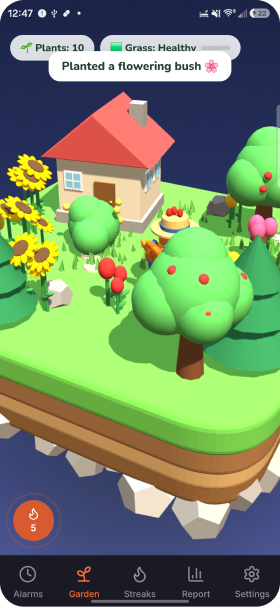
The Garden
A living garden that grows with your real wake-up history. Consistent wins make it flourish; misses show.
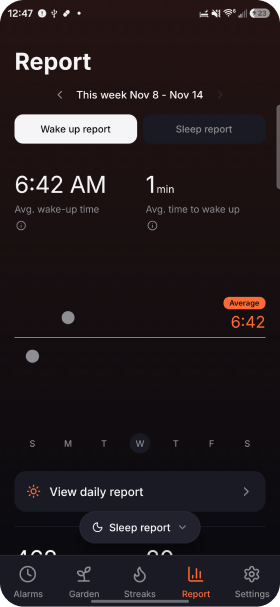
Reports
Real averages for wake-up time and time-to-wake, so your mornings stop being a mystery.
Milestone badges, 7 days to 365
Privacy
Your camera never leaves your pocket.
Photo, camera and microphone missions are verified entirely on your device. No network call, no log line, no analytics event ever sees that data — not even us.
Processed on-device, always
Zero uploads of camera/mic mission data
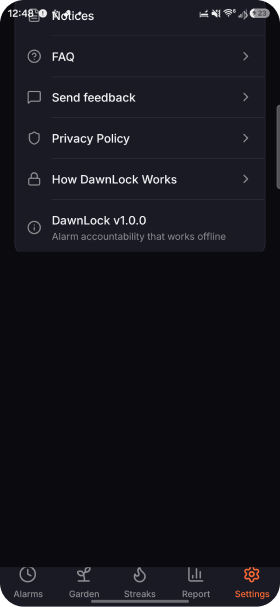
How it works
Three steps. One rule: no shortcuts.
01
Set an alarm, pick a mission
Choose a time and the wake-up mission that will actually get you up: math, typing, memory, shake, hold-still, or a photo.
02
It locks itself
Once it's close enough to firing, the alarm enters its Goal Lock window. No edits, no disabling, no deleting — from any screen.
03
Only a real wake-up stops it
The alarm rings until the mission is completed for real. Win, and it feeds your streak, your garden, and your badges.
FAQ
Questions you're probably asking
There's no backdoor once Goal Lock engages — that's the entire point. If you want more day-to-day flexibility, keep the lock window at the 4-hour default; save wider windows (up to 12 hours) for alarms you truly mean to keep.
Set an alarm you can't talk your way out of.
Cukkoo is pre-launch on Android. Join the waitlist for early access — no spam, just one email when it's ready.